

Introduction
For a startup-level Shopify store with 30 products, Shopify itself provides effective solutions; check descriptions, broken links, and page updates manually. However, this turns into a complicated or unmanageable task when the store grows; 30 products turn into 30,000 products. And for this type of enterprise-level store, Shopify Plus is the go-to e-commerce platform.
Although this is an advanced Shopify plan that offers additional features, but at the same time, SEO becomes a crucial factor in maintaining the store’s brand value as the store grows.
And here comes the solution! Implementing Shopify Plus SEO. In this article, you will understand everything about Shopify Plus SEO.
What is Shopify Plus SEO?
Basically, Shopify Plus is an enterprise-level e-commerce and retail platform built by Shopify for high-growth, high-volume businesses and large brands. And ‘Shopify Plus SEO’ means implementing search engine optimization strategies that help those large online stores become more discoverable in organic search results.
In the process of Shopify Plus SEO, there will be a few techniques:
- Duplicate Content Management
In this process, developers have to change the backend code of the product so that all different links point to the single official “master” link for that product.
- Managing Product Filters and Options
Product filters can create multiple URLs for similar collection pages. Managing these URLs helps search engines focus on important pages instead of crawling unnecessary filter combinations.
- Setting Up International SEO
If you are selling products outside of your region. Then, you should have different versions of your store with different languages and currencies. To make this, special language tags are placed in the site’s code.
- Technical SEO
This includes site performance, crawling and indexing, and structured data.
- On-Page SEO
- Fixing confusing duplicate pages
- Adding Special Search Snippets
- Organizing Categories Smartly
- Optimizing URLs, descriptions, and titles
- Image SEO
- Creating content aligned with search intent
- Off-Page SEO
- Tracking brand mentions
- High-quality backlinks
- Building a trustworthy reputation
- Influencer collaboration
Why Shopify Plus SEO is Important?
Just as water is essential for you, Shopify Plus SEO is crucial for large-scale stores because it may push your store into the rich/top results, driving higher sales, ensuring your store stands out from competitors, and scaling revenue.
However, there is a common perception among many Shopify Plus merchants and users that the platform itself handles SEO. While Shopify Plus offers several built-in SEO features, such as automatically generated sitemaps, canonical tags, and editable meta titles, but these features are insufficient for large-scale stores.
Differentiation and strategic SEO efforts are also crucial for it to rise above the competition.
How Shopify Plus SEO is Different from Regular Shopify SEO?

Shopify Plus SEO follows the same basic principles as regular Shopify SEO. However, some things are different compared to regular Shopify SEO. How? Let’s understand with the following points:
- URL Redirect Limits
Shopify Plus SEO scales up to 20 million redirects, while regular SEO is capped at 100,000 redirects. (Redirects are digital signposts that automatically send visitors and search engines from an old or broken web address to a new working page).
- International or Multi-store SEO
Shopify Plus SEO supports up to 9 expansion stores on custom subdomains or country-code top-level domains (ccTLDs), while regular SEO has limited localized structure options.
- Page Speed & Script Execution
In regular SEO, app scripts generally load via the front end, while in Shopify Plus SEO merchants have access to Shopify Functions and server-side pixel tracking to bypass front-end bloat.
- Website Speed
In regular SEO, tracking codes and apps load on the screen, slowing down the site. With Shopify Plus SEO, codes or apps can run quietly in the background, without affecting site speed.
- Wholesale Indexation
Shopify supports native B2B features across several plans, while Shopify Plus provides additional capabilities for complex wholesale operations, including more advanced catalog management. Merchants should carefully configure customer access, private pricing, and storefront visibility so confidential B2B information is not publicly accessible.
How to Manage SEO at Scale for Shopify Plus Stores?
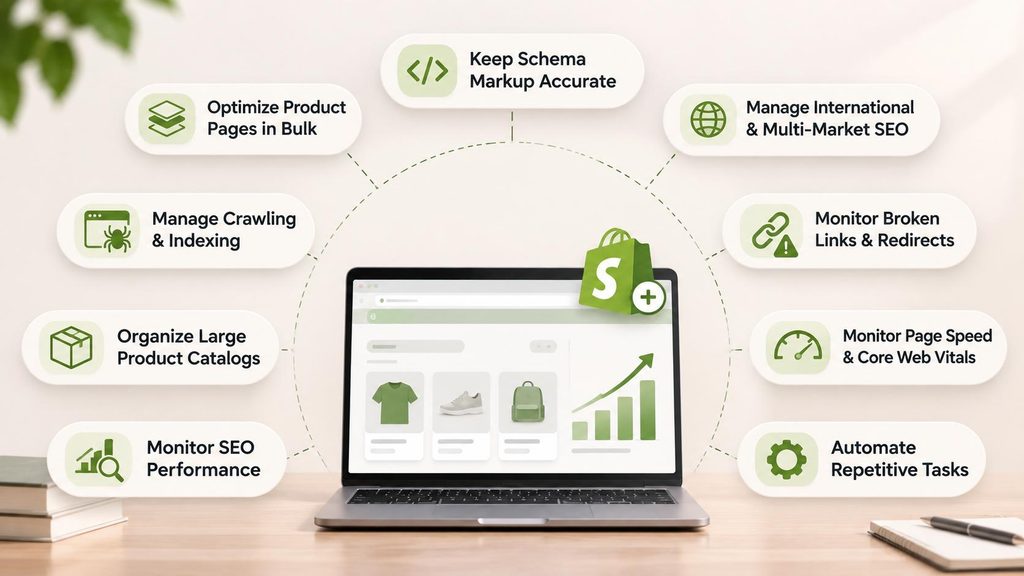
Imagine you own a store with 30 products, and managing SEO for it is relatively very simple. You can manually review product pages, update descriptions, check broken links, and monitor search performance. But what if you have 30,000 products? Can you manage them manually? Obviously not! So, Shopify Plus SEO comes in for larger stores.
Here are some practical ways to manage Shopify Plus SEO as your store grows:
- Organize Large Product Catalogs With a Clear Site Structure
When a store has thousands of products, organizing them into logical categories and collections becomes essential. So you should arrange products into relevant collections and subcategories based on how people shop. Also, keep important collections accessible from the main navigation and use internal links to connect relevant pages.
For example: Suppose there are 20,000 products in your store, including clothes, shoes, footwear, and accessories. So, you can’t place them all under 1 category, as it becomes difficult for users and search engines to find the products. That’s why you need to organize them under relevant categories with names like men’s clothing, women’s clothing, men’s footwear, women’s footwear, and more like this.
- Manage Crawling and Indexing Across Thousands of URLs
In large Shopify Plus stores, there are usually thousands of products, collections, and URLs. But not every URL needs to appear in search results.
Let’s understand this with an example:
Suppose you have 30,000 products, and each product page has a different filter based on size, color, and material, and each filter generates multiple URLs showing similar products. Due to these unnecessary URLs, it gets very confusing for search engines which URL to crawl and index.
To manage this, you need to:
- Review the page indexing report in Google Search Console
- Check important URLs for indexing problems
- Review duplicate pages and canonical tags
However, Shopify itself generates an XML sitemap to help search engines discover your pages. But you still need to make sure your collection pages are easily discoverable.
- Optimize Product Pages Using Bulk Editing
For Shopify Plus stores, it gets very difficult or exhausting to optimize the product page individually. It is better to create consistent guidelines for product titles, descriptions, images, and specifications.
For example:
If you are selling bottles, then your product description and title should clearly define your products’ size, material, capacity, color, and intended use.
You can use Shopify’s bulk editing and CSV import/export features that allow merchants to update every product record without opening the page separately.
With this approach, you can save time and effort while maintaining consistency across large product catalogs.
- Keep Schema Markup Accurate
Accurate schema provides structured information about your product, like price, availability, and ratings, making it easy to interpret by search engines.
And for a Shopify Plus store, it is very crucial and challenging to keep every product’s information up to date and structured.
For example:
If a product price is $400 and you change it to $500, but your schema still shows an older price of $400. Due to this, search engines receive conflicting information.
To fix this issue, you need to regularly monitor schema errors, missing properties, outdated prices, and incorrect availability details. And here, Shopify SEO apps like InstaIndex can help you to manage and monitor schema.
However, schema can make your product information accurate and structured, but it doesn’t guarantee rich results or higher rankings.
To understand its importance in more detail, read our guide on why schema is important for your Shopify store.
- Manage International and Multi-Market SEO
For Shopify Plus merchants selling their products across the world in various countries and cities. It is crucial to have different pages with different languages and currencies based on the country.
For example:
Your store sells phone covers in France, the US, Australia, the UK, and many other countries, so for you it is very important to have that product page in various languages so that users can understand the details on the page.
This is where hreflang tags help, telling search engines which region or country the page is intended for users.
Additionally, Shopify Markets provides built-in international SEO functionality that includes hreflang tags, canonical URLs, and market-specific sitemaps. But merchants still need to check translated content, localized URLs, and market settings, ensuring users receive appropriate information.
- Monitor Broken Links and URL Redirects
Large stores often change their inventory frequently, sometimes add products and sometimes remove products, and these repetitive changes create broken links and 404 errors.
For example:
Suppose you permanently delete a product from your store, but customers still visit its old URL through search results or existing links. They may reach a 404 page because the original product URL no longer exists.
To fix this issue, regularly monitor broken URLs, update outdated internal links, and use 301 redirects when a relevant replacement page exists.\
Furthermore, Shopify allows merchants to manage redirects individually or through bulk imports. This makes the process easier and faster, especially for large Shopify stores.
Apart from this, avoid redirecting every removed URL to the homepage if no other replacement is available; a 404 may be more suitable.
- Monitor Page Speed and Core Web Vitals
Large Shopify stores consist of many pages that include numerous apps, images, videos, tracking scripts, and much more. Consequently, it is obvious that the website’s performance is affected.
And due to this, it makes monitoring Core Web Vitals important. These metrics help you assess loading speed, visual stability, and responsiveness.
However, it is impractical to test all URLs of the store, including product pages, collections, and the homepage. Instead, you can opt for Google Search Console, PageSpeed Insights, and real-user monitoring tools.
- Automate Repetitive Shopify SEO Tasks
There are many tasks in large Shopify stores, and managing them all manually is nearly impossible. Especially when product pages and information change frequently.
That’s why Shopify SEO automation is useful. Not to automate every task, but to automate the repetitive ones that consume time and effort.
To help you with automation, you can use the ‘InstaIndex – Shopify SEO’ app. It offers a range of essential features, including IndexNow submissions, schema monitoring, 404 monitoring, AI-powered visibility tracking, and much more.
However, tools like InstaIndex can only help you in your SEO journey; they can’t replace the SEO process. SEO strategies are still important for better store visibility and ranking.
- Monitor SEO Performance and Prioritize Important Issues
For every large Shopify store, it is essential to optimize all of the store’s URLs; however, it is even more important to identify which issues require greater attention.
For this, you can use Google Search Console to find affected URLs and monitor organic clicks, impressions, indexing problems, Core Web Vitals, and supported structured data reports.
In short, prioritize issues affecting key products, high-traffic collections, or large groups of URLs.
From the practical ways of managing Shopify Plus SEO discussed above, you may have realized one thing: without proper strategies, tools, and structure, you may get buried under thousands of manual tasks, which is neither practical nor sustainable for a growing business.
Conclusion
For Shopify Plus, SEO is not something exclusive only to large stores; rather, it is about building a reliable system to organize products, monitor technical issues, maintain accurate information, and automate repetitive tasks. It is an essential requirement for large stores, as continuing to manage SEO manually over the long term would lead to recurring problems.
To sum this up, Shopify Plus SEO does not guarantee that your store will rank at the top of search results or secure better rich results. It just manages your large Shopify store efficiently. And your SEO strategies and efforts still matter.
If you’re still juggling between multiple SEO tools for multiple store tasks, then stop it! Because InstaIndex is there to help you.
Install InstaIndex and get access to exclusive features.
FAQs
1. What is Shopify Plus SEO?
Shopify Plus SEO is the process of optimizing large Shopify stores to improve their visibility in organic search results. It includes managing product pages, site structure, indexing, technical SEO, and search performance across large product catalogs and multiple markets.
2. How is Shopify Plus SEO different from regular Shopify SEO?
Both follow the same SEO fundamentals. However, Shopify Plus merchants often manage larger product catalogs, multiple markets, and more complex store operations. This makes automation, technical monitoring, and consistent optimization processes especially important.
3. How can I manage SEO for thousands of products on Shopify Plus?
Start by organizing products into relevant collections, creating consistent optimization guidelines, and using Shopify’s bulk editing features. Regularly monitor indexing, broken links, product information, and technical issues instead of manually checking every page.
4. Does Shopify Plus automatically handle SEO?
Shopify Plus provides built-in SEO features, including automatically generated sitemaps, canonical tags, and editable SEO titles and descriptions. However, merchants still need to optimize content, maintain site structure, monitor technical issues, and develop an effective SEO strategy.
5. How can I improve indexing for my Shopify Plus store?
Make important product and collection pages accessible, maintain relevant internal links, and monitor indexing through Google Search Console. IndexNow can also notify participating search engines about URL updates, but it does not guarantee indexing or higher rankings.
6. Why is schema markup important for Shopify Plus SEO?
Schema markup helps search engines understand structured product information, including prices, availability, and ratings. For large stores, keeping this information accurate is important because products and inventory frequently change. Proper schema can also support eligibility for certain rich results.
7. How does Shopify Plus support international SEO?
Shopify Plus merchants can use Shopify Markets to manage international selling experiences. Depending on the configuration, Shopify provides features such as hreflang tags, localized URLs, and market-specific sitemaps to help search engines identify relevant regional and language versions.
8. How can I manage broken links and redirects on a large Shopify store?
Regularly monitor 404 errors, update outdated internal links, and create 301 redirects when relevant replacement pages exist. Shopify supports bulk redirect management, helping merchants handle large numbers of URL changes more efficiently.
9. Can SEO automation help Shopify Plus stores?
Yes. SEO automation can reduce repetitive work, especially when managing thousands of products and frequently changing URLs. Tools can help with tasks such as indexing notifications, schema monitoring, and identifying technical issues. However, automation should support rather than replace an overall SEO strategy.
10. How can InstaIndex help with Shopify Plus SEO?
InstaIndex helps Shopify merchants manage technical SEO tasks through features such as automated IndexNow submissions, schema management, 404 monitoring, real-user performance tracking, and AI visibility monitoring. These features can help larger stores reduce repetitive checks and monitor important technical issues more efficiently.
Leave a Reply